|
Jump to navigation
Overclock your Nintendo DS Lite
04/16/07
UPDATE: There is now a GBAccelerator DS forum over at the Division 6 site.
This article shows how you can overclock or underclock Nintendo's latest handheld console, the DS Lite. The mod allows you to switch between four different speeds, ranging from .66x to 1.8x, right in the middle of your game. The wireless even works no matter what speed you are running. You can use a combination of the DS' own buttons to control the speed so there's no need to mount any external controls and mess up the look of your DS. The power LED will blink to tell you which mode you are in.
Why would you want to change the speed of your DS? Unlike regular computers and some other game systems like the PSP, DS (and GBA) games always expect the handheld to run at exactly the same speed. When you speed up or slow down the clock, the game speeds up or slows down. This is great for making your games harder or easier. It's also useful for squeezing some extra clock cycles out of the hardware so you can make more powerful homebrew apps. You can also show off how L33T you are to your friends if you are into that sort of thing (or if they even care).
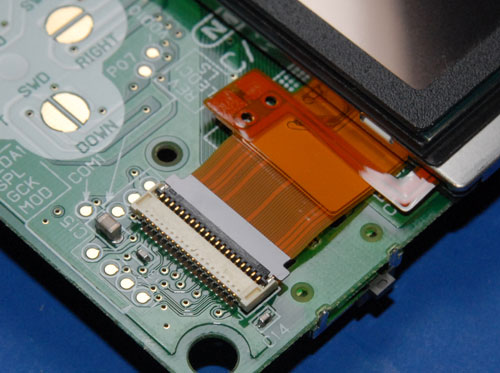
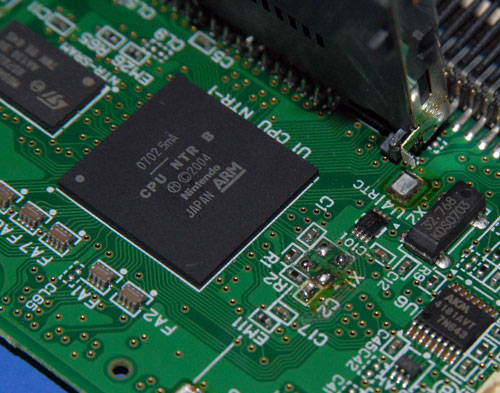
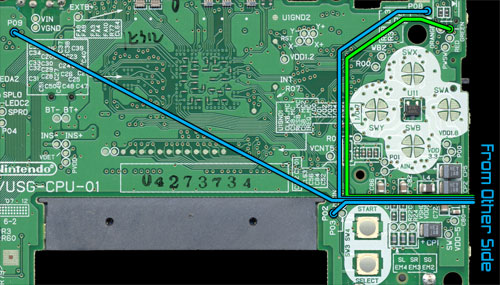
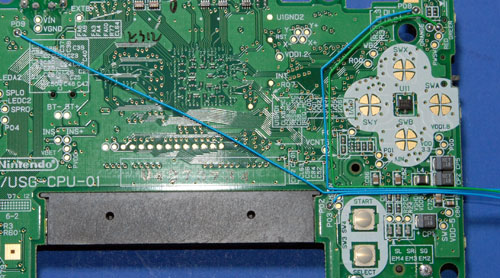
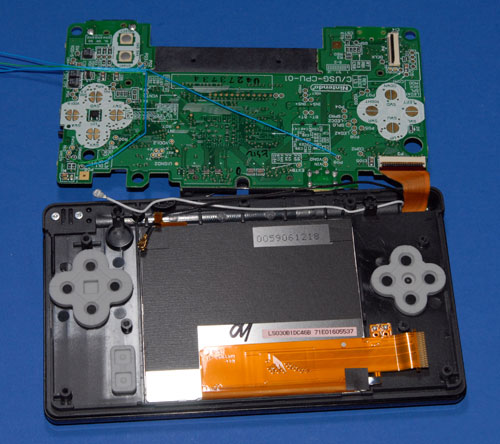
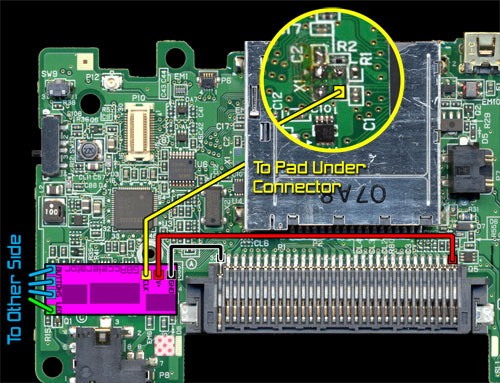
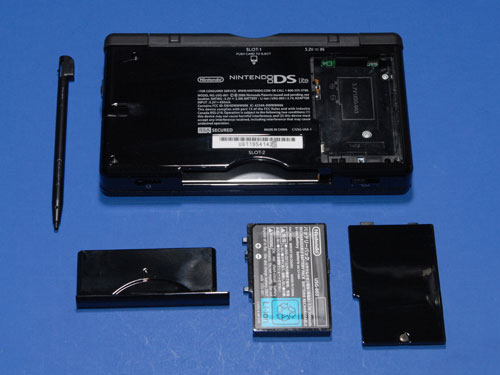
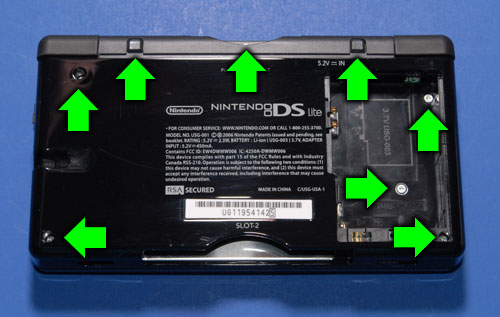
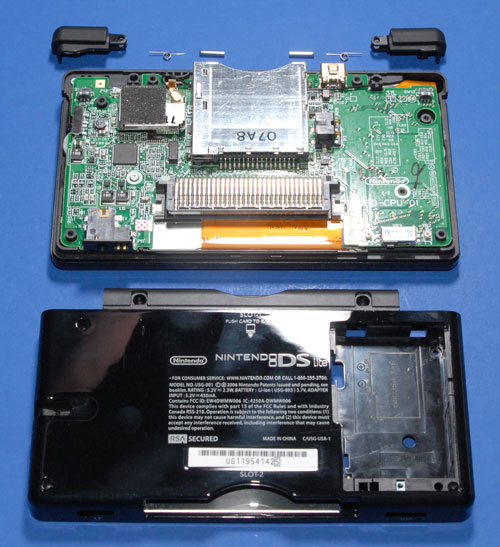
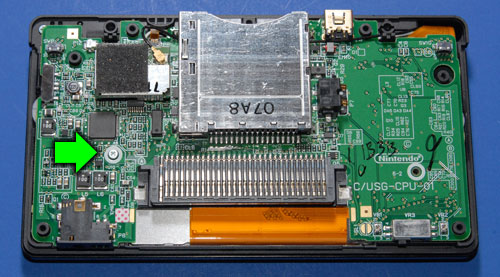
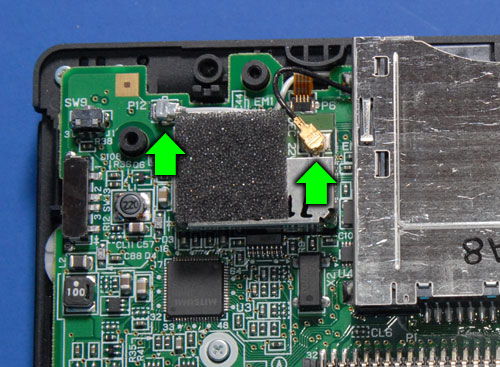
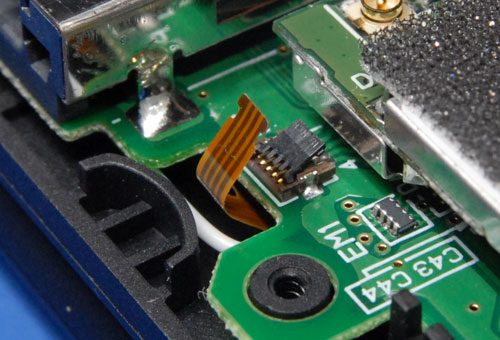
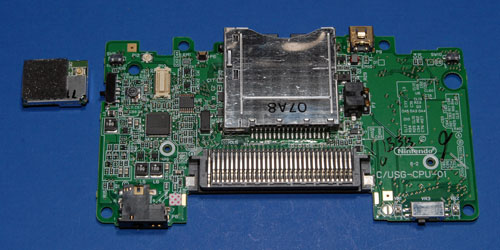
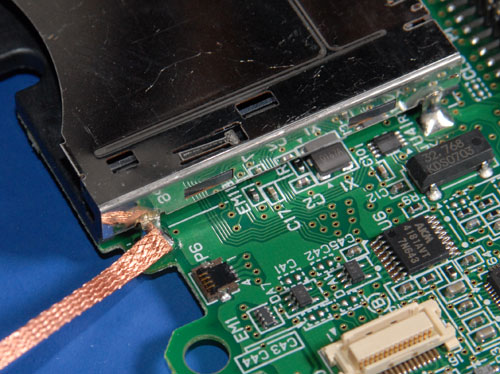
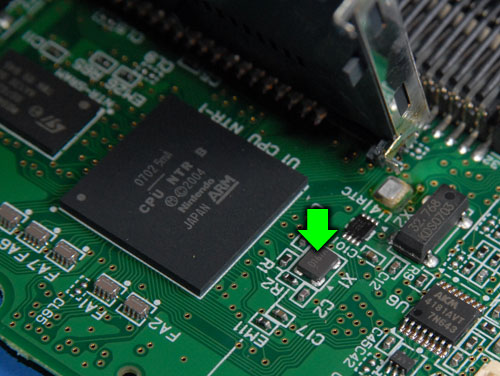
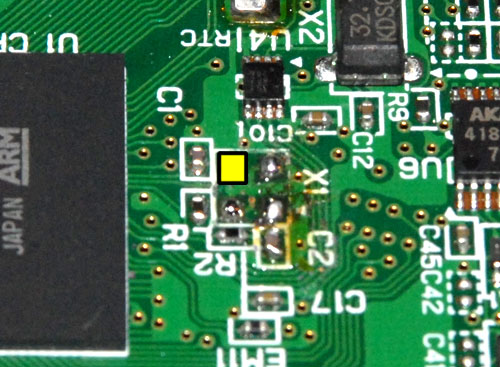
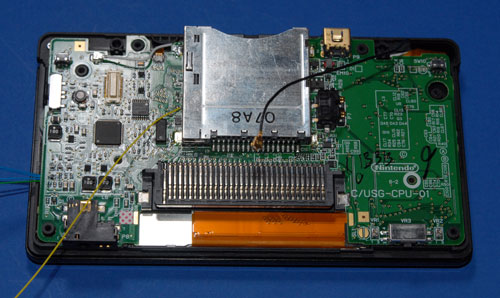
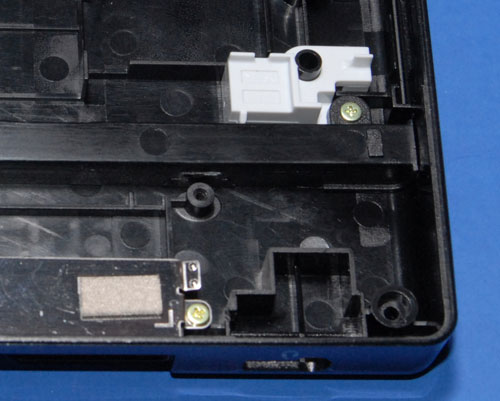
Take the DS Lite Apart Turn the DS Lite upside down. Use a phillips screwdriver to remove the battery cover. Remove the battery. Remove the stylus. Remove the GBA cartridge hole plugger thingy. ![]() Use a phillips and a tri-wing screwdriver to remove the eight screws from the back of the DS. Note: two of the screws are hidden under stick-on rubber feet. Use a utility knife to carefully peel them off so you can access the screws underneath. Try to set the feet somewhere where they'll stay sticky. Put the screws in your parts container or you will never see them again. ![]() Lift the back cover off of the DS. The bottom edge may need a little prying, but it should just snap apart. Carefully remove the L and R buttons if they haven't popped off and fallen on the floor yet. Be careful when doing this; the pin and spring in these buttons fall out very easily and are easy to lose. Put them in your parts container when you find them. ![]() There should be one screw left holding the PCB in place. Remove it. ![]() Disconnect the black antenna wire from the RF module and pull it out from under the game slot assembly. Disconnect the white microphone wire from the PCB near the RF module and bend it out of the way. ![]() Disconnect the small ribbon cable from the connector near the RF module. Do this by flipping the black part of the connector up and sliding the ribbon out. ![]() Flip the PCB and LCD screen together up out of the case. They will hinge on the ribbon cable that goes to the top screen. ![]() Disconnect the remaining two ribbon cables. Do this by flipping the dark-grey part of the connectors up and sliding the ribbon out. ![]() ![]() Place the LCD touch screen back in the case and set them aside. Now you have the PCB separate from the rest of the DS so you can work on it. Pull straight up on the RF module until it comes free of the PCB. Set it aside. ![]() Remove the Existing Crystal There are four metal tabs that hold the game slot assembly onto the PCB. Desolder these. Solder wick is probably the easiest, but use whatever solder kung-fu works for you. ![]() Lift up on the slot assembly. It will swing back on the pins which are still attached to the PCB. Now you have easy access to cryxtal X1. ![]() Desolder and remove the crystal. If you mangle it that's okay since you won't ever need it again. ![]() Attach a wire to one of the solder pads where the crystal used to be. This diagram shows you exactly which one: ![]() Bend the slot assembly back into place and re-solder it to the PCB. Install the GBAccelerator DS Flip the PCB over so that the front side is facing up. Solder the three button wires (blue in diagram) and the LED wire (green in diagram) to their respective solder points. Route the wires across the board as shown in the diagram. This is important so that they don't interfere with any buttons, standoffs, etc. Let them hang off the edge for now.
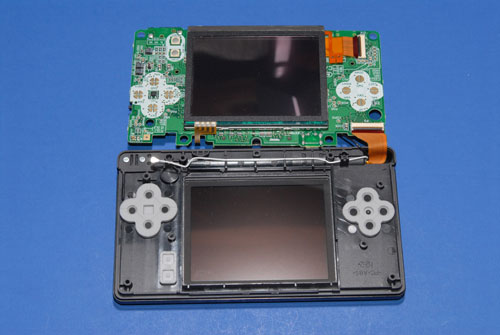
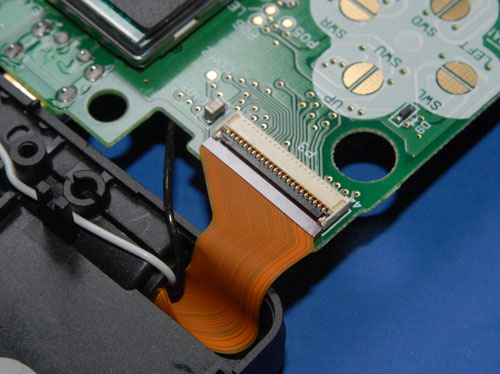
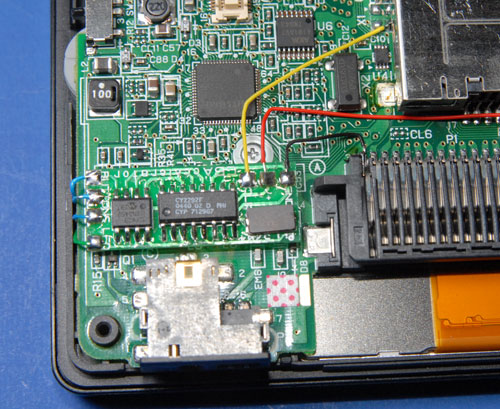
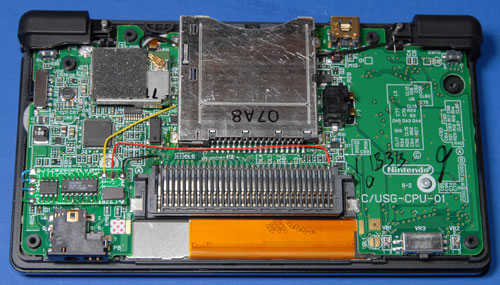
![]() ![]() Lay the board next to the top half of the case. Reconnect the ribbon cable that goes to the top screen. Note: the ribbon connectors in the DS Lite don't slide back together very easily. Make sure you slide the ribbon all the way in before flipping the latch back down or DS won't even boot. ![]() Lay the LCD touch screen on the PCB and reconnect its ribbon cable. ![]() Flip the LCD/PCB combo over into the top half of the case. Make sure the screen lines up with its opening. As you lower the board into position the tuft of wires you connected to the other side of the board should bend up and around the edge of the PCB. Reconnect the small ribbon cable and the white microphone wire. ![]() Replace the screw that held the PCB into the top half of the case. Use double-sided tape to stick the GBAccelerator DS chip to the PCB. Make sure you place it in the position shown or there might not be enough room for it when you go to put the bottom of the case back on. ![]() Make the remaining wiring connections as shown in the diagram. Be careful not to hold the soldering iron on any connection for too long or you could lift the pad from the DSAccelerator or DS board.
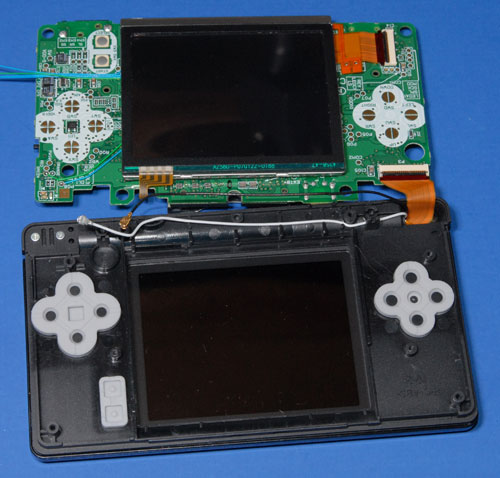
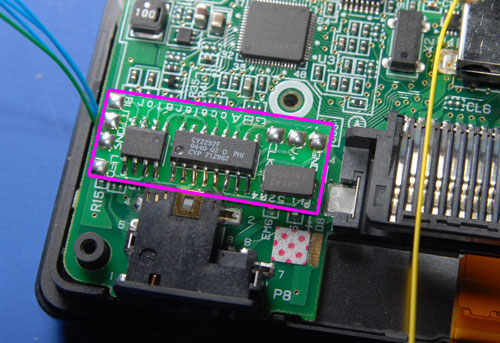
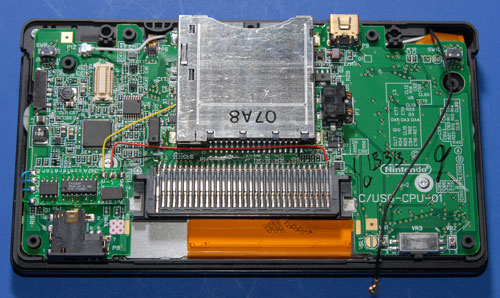
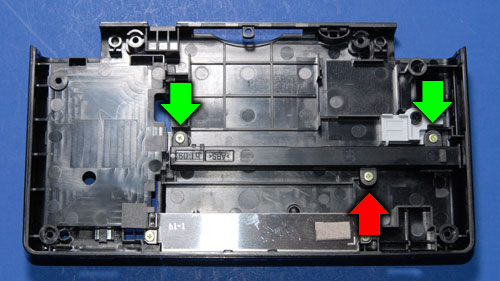
![]() Once you are done you will (or at least should) end up with something that looks like this: ![]() ![]() If your installation looks different, go fix it! Put the DS Lite Back Together Now you need to make a little extra room in the back cover for the chip you just added. Remove the three screws that hold the stylus channel onto the back cover. ![]() Remove the stylus channel. Use a utility knife to trim off the middle screw tab (the one that had the red arrow pointing to it). Re-install the channel, but remember now you only need two screws. Save the third one for your next project. ![]() Reinstall the RF module onto the DS Lite PCB. Run the black antenna wire back under the slot assembly and connect it to the RF module. Very carefully put the L and R buttons (including their pins and springs) back into place. ![]() Gently lower the back cover onto the rest of the DS Lite. It should sit back down into position without requiring much force. If it feels like something is hitting the GBAccelerator chip, use needle-nose pliers to gently scoot the chip around until it is out of the way. Replace the remaining screws that hold the back cover on. Replace the two rubber feet that you had to remove. Reinstall the battery. Reinstall the battery cover. (You probably want to leave the stylus and cartridge-plugger thing out so you can play.) Flip the handheld over, put a game in and open the screen because it's time to test out your handiwork! Testing Out Your Handiwork Turn on the DS Lite. It should boot just like you hadn't spent the last hour or ten modifying it. Start whatever game you inserted. It should look pretty normal too. Press L, R and Select. Your game should start running faster now, and the power LED should start blinking to indicate that you are in "fast" mode (1.4x). Press L, R and Select again. The game will go even faster and the LED will double-blink to let you know that you are in "ultra" mode (1.8x). Press the buttons again. Now your game will be running much slower and the LED will be fading in and out ("slow-motion" mode, .66x) One more press of the magic button combination will bring you back to normal, boring 1x. Congratulations, you now have an overclocked Nintendo DS Lite! You even have a part left over, which is usually a good sign that you did a project right. Did you find this article interesting or useful? Why not subscribe to the Modd3d RSS Feed?  
http://www.modd3d.com/articles/item/overclock-your-nintendo-ds-lite Comments
I find it funny that the GBAccelerator module uses a Cypress clock synthesizer that maxes out at 66MHz at 3.3V so they have to overclock a clock chip in order to over clock the DS!!!!
Posted by MW on 04/17/07 at 14:33:30
Out of curiosity, what happens in multiplayer if you switch the clock cycle?
Posted by Elder on 04/17/07 at 14:46:45
MW- The ARM CPU multiplies the clock speed x4 internally. The GBAccelerator is only running @ 11-29mhz.
Elder- It seems to depend on the game. Some let you do it no problem and some crash completely with a communication error.
Posted by Scott. on 04/17/07 at 16:22:10
yea, no thnx i dont want to f@!@@ up my DS, so yea, forget it, no actuall use any way, who care
Posted by pyroanimaniacs on 04/17/07 at 16:31:16
Wonder if this would speed up the Opera Browser, which tends to render very slowly.
Posted by Adrian on 04/17/07 at 17:14:21
Do DS games really get timed by CPU? I thought most of them would be timed by screen retrace (especially 3D ones, since the 3D chip in the DS is *extremely* retrace-sensitive). Or does this mod also overclock the LCDC?
Posted by fluffy on 04/17/07 at 17:21:51
I didn't know about the 4x multiplier in the DS. Since that is the case, I'd really like to see just how high the DS can go before crashing!!! Maybe 116MHz was it?
Switching to 266MHz might be funny! :)
Posted by MW on 04/17/07 at 17:27:47
The Cypress clock synthesizer costs what
$1? What do the other chips on that board cost?
Posted by fueriose on 04/17/07 at 21:26:17
virtually all components are trivially cheap. you paying for marketing.
Posted by dif on 04/17/07 at 21:49:12
How does this work with the GBA support? I would love to fast forward through all of the SNES rpg conversions.
Posted by Jon on 04/17/07 at 22:05:29
seems dangours
Posted by car insurance quote on 04/17/07 at 22:57:25
This is great for making your games harder or easier.. what a stupid reasone ..
Posted by torpedo.ax3@Gmail.com on 04/17/07 at 23:06:15
Pyroanimaniacs- You need more faith in your skillz! =)
MW- I did hook a function generator to my DS to see how high it would go. I got to about 132mhz before the audio got all fuzzy and the thing wouldn't boot any more. Jon- It affects GBA games too. Torpedo- Dang, man. You need a cookie or something.
Posted by Scott. on 04/17/07 at 23:46:29
Thanks Scott. Awesome work by the way.
Posted by Elder on 04/18/07 at 02:57:36
that is so lame. you morons need to get a life
Posted by pfft on 04/18/07 at 05:12:19
que idiotez, para que cargarte yu consola?
Posted by Sabio on 04/18/07 at 06:35:52
HEY YA DAMN RETARD THATS DEFINETLY NOT HOW YOU SPELL GAY......FUCKING IDIOT
Posted by ??? on 04/18/07 at 07:06:52
to you guys, keep it up. to everyone else who took the time out of their lives to find this site, read it, then flame it, you are all bigger losers than what you claim they are. if you all dont like it so much, why did you waste the time to come here?
people do this sort of thing because they can. alot of times, just as a test of their skills, other times, to show it off. nice job.
Posted by Rob on 04/18/07 at 07:23:08
and some people do it to increase there skills like me i moded mine and it works great and it was the fist time ever soldering but it was fun. and the after affected was funny when my buddys came over and i showed them how fast my games go. lol
Posted by theflyingflea on 04/18/07 at 08:17:00
I am only guessing, but this spammer is probably about 9 years old, he is probably annoyed because he can't solder or his parents won't allow him to get either a DS or a GBAccelerator, so he is angry at the DS community for having DSes. If not, I expect he is about 11.
He can't spell, he probably misses school to play on World of Warcraft. I have 4 words and 2 (or 4 if you count quotation marks) punctuation marks. "Dude, get a life."
Posted by Lee on 04/18/07 at 12:25:43
Other than that, good work Scott ;)
Posted by Lee on 04/18/07 at 12:26:47
ya ds lites are cheaply made, nintendo is making a bundle off of these. and look at the quality. laughable. sony is strougling because theirs costs a deal more to manufacture. nintendo was smart because they knew people would buy it even if it had poor graphics.
Posted by Jet on 04/18/07 at 15:24:36
To the poster above me
Its "nintendo was smart because they knew people would buy it if the game is good, unlike PSP"
Posted by Jet is gay on 04/18/07 at 15:42:25
GREAT WORK!
Posted by Samel on 04/19/07 at 03:37:43
To "Jet is gay" <nice name :/
Yeah, Nintendo focus on the gameplay and don't take the the graphics as a number one. Look at the Wii, it's cool, fun to play, they focused on how you play the game, not how good it looks. They are selling out everywhere! Graphics isn't everything! This would be great for speeding up the Opera browser. To Jet... There is nothing wrong with how good the DS is made, it works, it doesn't have any major flaws, I've yet to hit a problem with my DS Lite. I don't think you can talk much about things like this seeing as your English skills are really bad. You can't spell, you don't capitalize your sentences, and you don't use punctuation marks.
Posted by Lee on 04/19/07 at 10:43:52
This is cool just for the underclocking. Some of the DS games with time-based minigames would actually become possible to complete.
Posted by Random on 04/20/07 at 11:51:49
Haha yeah
Posted by Lee on 04/20/07 at 14:41:39
I'm sure Jet just didn't realise that fueriose is almost certainly talking about the GBAccelerator, but I wouldn't try to compare it with the PSP. I don't trust what I'm getting inside a sony product anymore, the parts and internal design of things that are supposed to be the same just alarm me (I once had three differing current model DVD players made in different countries, all with the same model name/number and apparently the same to use, but build quality inside was hugely different).
As for the DS max speed, should be around 200MHZ, as it's an ARM9E (I think, correct me if I'm wrong) but its battery draw is probably too high for the little DS battery, so that would need changing for it to work. I wondered about this, this is just like the old days with soldering on a new gameboy speed crystal on the original gameboys. Made Pokemon a much better game to play when you could accelerate the walking :)
Posted by Loader on 04/22/07 at 12:35:22
Well this should certainly help for homebrew stuff like NitroTracker right?
Or will support for the mod have to be coded into the apps?
Posted by fueriose on 04/23/07 at 06:00:19
Well, as you see in the video, the speed and pitch of the music changes when you overclock. The same would happen in NitroTracker. So, it would have to be adjusted to make up for that. But as NitroTracker isn't that CPU intensive, there is no need for overclocking in the first place. Other homebrew, especially games, might be able to use it though.
Posted by 0xtob on 04/23/07 at 12:53:07
would this chip interfere with other chips installed into the ds?, if they fit together..
Posted by jon on 04/26/07 at 20:23:03
would this chip work with the origional ds?
Posted by jon on 04/26/07 at 20:23:43
Yep, here's how to do a DS Phat:
http://www.modd3d.com/artic... Do you mean does the chip interfere physically? No. Electrically? There is no metal to metal contact, so no. ...or did you already mod your DS with some other kind of chip? Which one? I want to play.
Posted by Scott. on 04/26/07 at 22:27:09
im just wondering if you can put it with other chips in the future as long as the button combinations are different.. but if you used a different chip too, they might malfunction together
Posted by jon on 04/27/07 at 10:43:56
They should work together just fine. You can choose which buttons you hook the chips to, so just pick different combinations for each chip.
Posted by Scott. on 04/27/07 at 11:04:44
Hi Scott, sorry for bothering you but I was hoping you could take a look at my comment on the DS Phat overclock page.
At this point I'm worried that I have a broken touch screen. Not because I disassembled it btw, many thanks for your guide. If you could help me I'd be very grateful. Thanks in advance.
Posted by Emmanuel on 05/03/07 at 18:48:46
Jesus, whats everyones problem with Jet? The ds is cheaply made, the graphics are poor in comparison to the psp, and I absolutely love it. I have a psp and a ds, and I like em both. The ds is alot cheaper both in price and hardware, but so what? I love it anyway. You can't argue with Jet over a point that is proven by clock speeds and ram chips. The psp is of a better build than the ds, so fucking what?
Posted by Anodyne on 05/15/07 at 15:15:48
Yeah, same with the wii as well. It Is technologically less advanced than the ps3 or xbox, doesent mean its less fun which is a matter of opinion. God, he never said he didnt enjoy any game on the ds. Stop yelling at Jet until he actually does something you should be offended about.
Posted by Dave on 05/15/07 at 15:18:53
Jet implied that the DS was of poor construction, which is just plain wrong. If you come to a web page with an article written about the DS with lots of DS fans reading it and say something like that then you are inciting a flame war, and thats what I am offended by.
Posted by Good Sir. on 05/20/07 at 09:36:49
fank you for giving me some help
Posted by cameron sim on 05/25/07 at 06:02:47
Well, i just installed one. It didn't work. When i push the button combination it freezes and the audio goes haywire. Anyone able to help?
Posted by smopoim86 on 05/26/07 at 11:38:16
wow this all seems pretty cool....i just dont think i have the skills to do it.
Posted by linkinparkfan555 on 05/28/07 at 14:04:48
Sweet Nice if you wanna look like a 1337 haxxor in front of you non 1337 friends, Good Job!
Posted by Me on 05/30/07 at 15:55:20
waste of money and time!
Que perdida de dinerio y de tiempo!!
Posted by Wizenpachito on 06/05/07 at 12:20:00
Nice Work!
Does it work well with Opera Browser? If it does, then I will mod mine in a heart beat! ;)
Posted by skibur on 06/11/07 at 21:00:35
(to fluffy) I'd be willing to bet that the game execution speed is tied to the vertical sync interval on the screen, but since the LCD timing generator is internal to the ARM and since you're changing the external clock going into the PLL everything on the chip will run faster.
(The reason it's crapping out at ~133MHz is quite possibly the SDRAM/MCLK limit for the external bus...)
Posted by clay on 06/20/07 at 11:47:27
That's awesome! If I had an extra DS hanging around I'd do this. I'd do it to my current one but I'm sure I'd break it.
Posted by Ziekerz on 06/23/07 at 22:48:57
WOW
Posted by Cliff on 06/24/07 at 17:07:33
online games is ok??
Posted by andychan on 07/02/07 at 09:20:35
hmm not half bad but if it doesnt work or i screw it up my DS would be in a really bad shape not to mention it cost alot.
Posted by OK on 07/08/07 at 10:49:30
Sweet hax! I also Have a DS Lite and Jap PSP its cool cept the Jap PSP is made in China!?!?! lol anyone know how to overclock a PSP for homebrew?
Posted by PCGeek1987 on 07/08/07 at 21:28:02
goood, soooooo Opera browser runs faster?
maybe using that and the modified Opera Browser that uses internal memory of M3 lite, G6 or Supercard, we can boost up the performance and speed of opera browser. DS Browser original memory expansion is just 10 mb, G6 and M3 internal memory ram (swap memory) is 32 mb, M3
Posted by Luis - España on 07/10/07 at 04:48:46
this is like a total fraude
Posted by polly on 07/10/07 at 16:07:55
Playing online games in general is okay. Some games seem more tolerant of the different speeds than others.
I tried running the Opera browser (standard configuration, no M3 or anything) and it worked fine in FAST mode. Loading pages/images did speed up. It didn't like ULTRA mode so much. There were screen glitches and the connection dropped sometimes. The bottom line is you can make Opera run faster.
Posted by Scott. on 07/11/07 at 16:57:59
You can't do this type of mod with the PSP since it is designed to run at different clock speeds (which is controlled by software). Changing the clock speeds won't make your game speed up or slow down (much like a PC).
I think there are hacks to change the clock speed in software but I've never tried any of them.
Posted by Scott. on 07/11/07 at 17:09:29
CAN I HAVE A FREE DS?
Posted by LUKE on 07/15/07 at 07:47:21
Wow, I am rather newbish about all things electronical, and I'm surprised that people can do this. Me, I'm always too worried to try or even think of doing anything like this. I'm going to take an electronics class next year (sophmore -spelled right?- year) and maybe then I'll try it out. Ofcourse, my DS is a regular one, so I'm not sure if it exactly the same. Well, anyway, cool work, guys.
Posted by John on 07/24/07 at 18:31:13
Awsome!I find it funny that the GBAccelerator module uses a Cypress clock synthesizer that maxes out at 66MHz at 3.3V so they have to overclock a clock chip in order to over clock the DS!!!!
Posted by Cole on 08/02/07 at 08:28:58
Awsome!I find it funny that the GBAccelerator module uses a Cypress clock synthesizer that maxes out at 66MHz at 3.3V so they have to overclock a clock chip in order to over clock the DS!!!!
Posted by Cole on 08/02/07 at 08:29:55
Could anyone tell me what all the chips on the GBAccelerator DS are? And if someone is feeling really nice maybe post some higher resolution photos of the chip?
Thanks for reading :) and for any help in advanced :)
Posted by Zylkr on 08/02/07 at 08:42:18
Awsome!. I find it funny that the GBAccelerator module uses a Cypress clock synthesizer that maxes out at 66MHz at 3.3V so they have to overclock a clock chip in order to over clock the DS!!!!
Posted by Leeana on 08/03/07 at 10:34:46
you runluhuhuhuhuhu
Posted by leanna on 08/07/07 at 08:36:18
how dum r u
Posted by zee on 08/08/07 at 05:56:37
lol, overclock your DS.
It is very 1337 of you though. If I could afford to do this and not mess it up I probably would.
Posted by Luke on 08/08/07 at 18:54:54
Could I do this on metroid prime hunters using wifi.
Posted by The Craig on 08/19/07 at 21:58:58
Scott, very well well done, sir! Thanks.
I'm drooling and can't wait to upgrade (or brick) my DS. Just need one thing, a GBAccelerator DS. Could make, given a higher res photo of its 3 ICs (or even a schematic :) Then the mod would be truely hb and excellent.
Posted by dc on 08/29/07 at 00:17:56
People keep asking about what chips are used on the GBAccelerator. Basically the thing is based around a Cypress CY2292F clock chip. The smaller chip is a PIC microcontroller that reads the buttons, controls the LED and tells the clock chip which frequency to output. The third part is a 16mhz crystal that the clock chip uses as a time base.
Unfortunately this isn't the kind of device where you can just buy the parts and make one. You would need to write a program for the PIC and have a PIC programmer. You also need a programmer for the clock chip, which costs > $400 last time I priced them at DigiKey. I hope that helps those of you who are curious about the chips!
Posted by Scott. on 08/29/07 at 01:50:39
Thanks, Scott and sorry to add pain.
Worth placing an order, in that case.
Posted by dc on 08/29/07 at 06:24:25
Yjis fucked up my DSit wont start anymore
Posted by help on 08/31/07 at 19:57:35
this fucked up my DS it wont start anymore*
Posted by HELP ME on 08/31/07 at 19:58:52
Shoot me an email and I'll see if I can help you get up and running.
admin-at-modd3d-dot-com
Posted by Scott. on 09/05/07 at 14:05:01
Do you have anything that i can replace slot 2 on my nintendo ds because i lost it.
Posted by crystal parks on 09/05/07 at 15:49:48
You mean the blank pluggy thing? I don't have anything. I'd check on eBay for one or maybe a dead parts-only unit you could pick up for cheap.
HELP ME- Did you get your problem all sorted out yet?
Posted by Scott. on 09/10/07 at 23:44:44
This sounds pretty awesome but I'd never do it to nervous, and some how my DS would blow up on me...
Posted by XXX on 09/16/07 at 10:25:20
hello Nintendo DS ^_^
Posted by emem on 10/05/07 at 00:24:25
wow i would never do this. my ds is sort of broken now anyway. see, there was a crack on like, the little bar that keeps the top and touch screen connected. you know, that bar with the microphone on it? well there was a crack on it. and that crack broke up like the peice of it. but everything still worked fine. then my friend was playing my ds and the screen fell off, but it hung on the 2 wires and some orange ribbon that was inside of the crack but we put it back together. and then, the top screen started getting all fucked up. like, it was all green and weird. but it still worked fine and i played. and now today, the screen broke off again and held onto the ribbon but the ribbon ripped! and the whole game turned off, and now, when i try turning on the DS, it goes on for like a second, and then just turns ff. anyone know what i should do?
Posted by michellikinzzzz issss fuckkkinn pimpinnn on 10/08/07 at 14:49:30
I cannot desolder the gameslot for my life. I guess the radio shack 25 watt irons dont get hot enough. :(
im going to just reassemble and hope things work i guess
Posted by lazyjoe21 on 10/13/07 at 15:54:25
how do you open the top screen
Posted by brett on 10/19/07 at 15:06:21
Posted by upgrader on 11/14/07 at 20:04:15
For me, my DS is very precious to try modification like this
Posted by San on 11/23/07 at 02:04:47
-i wonder if this would help the guy who made the quake homebrew. since hes working on quake 2 atm this seems like a handy technique :D
-i dont realy care for punctuation or spelling :p -i will also never visit this site again as i found it searching for black DS lite pics lol!
Posted by black ds lite picture on 11/24/07 at 19:07:48
so easy
Posted by me on 11/25/07 at 18:27:29
my ds doesnt work anymore :/
the green light goes on but then the whole thing turns off. i think it can be fixed, but im not sure how... i think i cant get the ribbon cables firmly connected like they used to. anyone want to take it off my hands? someone more talented could probably do it. or better yet, how much could i pay one of you guys to get it going again? lol
Posted by lazyjoe21 on 11/29/07 at 12:21:33
i have one question how is the mod chip connected to the ds pcb???
Posted by modzar99 on 12/04/07 at 10:04:50
nevermind i finally figured that it was all one big chip!!!
Posted by modzar99 on 12/04/07 at 12:23:07
@ michellikinzzzz issss fuckkkinn pimpinnn
Sound like you need some parts... a new shell and top screen at least. You can order the part off of many websites and as a bonus you get to chose a new DS colour(even some that nintendo never released) You can try Ebay but if you got time to wait i use DealExtreme. And while you got your DS open why not do this mod?
Posted by Just a random Surfer on 12/13/07 at 01:47:48
awesome, but... its only DS
Posted by ninjay07 on 12/17/07 at 17:45:49
I would do this but my DS would somehow find a way to explode in my face, but then agoin i could ask my dad to do it he's very good with electricals and chipping...
BTW i'm 17 before anyone says i'm incompetent etc (don't take this personally any1 just ppl call me incompetent a lot because i can't be asked doing things which aren't really needed)
Posted by Curtmaster on 12/21/07 at 11:53:42
@ Curtmaster
lolwut?
Posted by ^_^ on 12/24/07 at 09:12:18
screw ds and nintendo microsoft with the 360 dominates nintendo and sony
[as of now] but hey im not judgemental maybe they'll come up with something amazing in the future??? \ must wait "/
Posted by dragon force on 01/04/08 at 20:49:43
screw ds and nintendo microsoft with the 360 dominates nintendo and sony
[as of now] but hey im not judgemental maybe they'll come up with something amazing in the future??? \ must wait "/
Posted by dragon force on 01/04/08 at 20:50:04
Interesting, what does this do to the temparature of the processor? whats the rated design speed of that ARM processor anyway? battery life isnt very disconcerning especially since there are replacement models with higher capacity, however temperatures do bother me, my overclocking projects all last longer with apropiate cooling...anyone has any insight on this matter?
Posted by Patrick N on 01/07/08 at 00:18:38
what i tried this and it dident work this is fake bye
Posted by cecilia on 01/08/08 at 10:31:55
MAN! my nintendo ds broke like 3 days ago and they wont sell then untill febeury and i got this game that is raw vs smackdown 2008 and i want to play it today but i have too wait a whole month (really mad right now!!) not trying too be mad but i am can somebody give me a tip plz plz plz!! please and thank you!!-cecilia
Posted by cecilia on 01/08/08 at 10:37:54
Nice, but for people who aren't so talented to build anything it isn't advisably.
Posted by Cole on 01/18/08 at 13:32:08
I like it but who needs it.
Posted by shit on 01/25/08 at 05:39:01
waste of time, yet very clever.
Posted by silver on 01/27/08 at 11:58:00
looks fun, hard to assemble, its probly worth the assembly chaos,(not really worth the money, or screwing up your ds lite) btw Will this work with a Electric Blue DS original?
Posted by NK on 01/31/08 at 22:16:35
Useful, but the last time I tried to "fix" my DS by replacing the bottom LCD, it stopped working (anyone know how to fix that? the orange light flashes briefly when I plug it in to the charger, but other than that I've got nothing). I seriously need a friend who can do these things for me...
Posted by Guzophela on 02/02/08 at 21:14:57
Hey Scott, this is a great looking mod. I am heavily considering doing it but i find myself unsure of its wide spread acceptance in the DS community, that in particular does not bother me. My problem comes from not being able to find anyone that has done this. I can not see why more people are not interested in this, it seems to me that this would be great for so many games. Anyhow i was hoping you could direct me to a forum discussion about this chip or something that i could peruse to see how people liked it, Failure rates in install and the chip, you know all those little things that help a person decide. For instance i assume when you run this mod it speed up the internal clock in the DS so time/space will be in constant flux when play DS but does that have adverse affects on games that utilize the clock(animal Crossing/pokemon)? Anyhow i figure your the guy to ask and any help would be great. Thanks.
Posted by HeronewB on 02/02/08 at 22:55:31
@Guzophela- from what i have read the ribbon cables can be tricky to place in correctly you may want to check they are in all the way.
Posted by HeronewB on 02/02/08 at 23:02:07
HeronewB- The real-time clock in the DS is separate, so changing the CPU clock speed won't affect any games that depend on actual time (yes, you still have to get up at 6 in the morning to get the UFO in Animal Crossing). The characters would move and talk faster/slower but things that happen at ?o-clock wouldn't come any sooner/later.
Unfortunately I don't know of any "GBAccelerator DS Club" that you can check out right now. Interest seems to be picking up lately, however, so I'm looking at setting something up.
Posted by Scott on 02/02/08 at 23:32:21
I have been posting in forums about it all over the place looking for others that have done it...maybe that is helping the intrest, possible you could send me a chip as payment...lol, Or even more possibly i should buy one before you sell out.
Posted by HeronewB on 02/02/08 at 23:52:23
I installed the GBAccelerator DS in my DS lite and it does function as advertised.
I would like to mention however that is can be dangerous to switch clock speed in the middle of some apps. I tried to switch speed in the middle of QUAKE DS and the game froze. Upon rebooting the DS, I found that it had corrupted the filesystem on my flash-card. LUckily, I keep a mirror image of it on my PC, so I did not loose any data.
Posted by RetroMan on 02/06/08 at 15:33:53
Good to finally here a bit of feedback, thanks Retroman...know any forrums that cover this Mod?
Posted by HeronewB on 02/06/08 at 22:24:41
GBAccelerator DS Club = http://www.division-6.com/d...
The comments here are getting pretty long. I think we should move the discussion there and maybe we'll hear from some more folks who have modded their DS.
Posted by Scott on 02/07/08 at 02:51:39
Does this work if you have a DS Original?
Posted by ty360 on 03/02/08 at 08:46:42
Posted by Scott on 03/05/08 at 01:01:19
Wow, cool, I'll try it some time.
Posted by Elias on 04/10/08 at 12:50:50
This is just AWESOME!!
I have to say that this is the far best tutorial i have ever seen. Not a single "what should i do now? :|" Just Perfect. Will work best for slow rpg games or sloooow and boring storylines you have seen over and over again and you can't skip. Will try this some time! I really apreciate your time! :) Good luck
Posted by SaNt on 05/07/08 at 13:28:27
Add Comments |
||||||||||||||||||||
|
  Powered by Nucleus   |   All contents copyright © 2006-2008, Division 6. All rights reserved. |
||||||||||||||||||||